

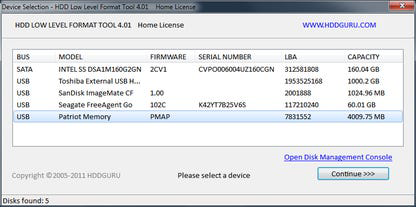


Description
Download HDD Low Level Format Tool – HDD low level format, hard drive formatting, data erasure, disk utility, low-level formatting tool, SATA IDE SCSI drive, flash card formatting
Overview
Purpose and Real-World Use Cases
HDD Low Level Format Tool is a specialized freeware utility designed for low-level formatting of hard disk drives and flash storage devices. The application enables users to perform deep-level disk erasure, re-certification, and structural reset operations on SATA, IDE, and SCSI drives. This functionality is particularly valuable in scenarios involving drive maintenance, data sanitization, or preparing storage devices for reuse. The tool is commonly used by IT professionals, system administrators, and advanced users who require complete data removal or performance optimization of storage media. It supports both internal and external drives, including those connected via USB and FireWire enclosures, expanding its utility beyond standard internal installations. The software’s ability to erase partitions, Master Boot Records (MBR), and all user data at the bit level ensures that no residual information remains, making it suitable for secure data disposal. It also helps in realigning bad sectors and resetting internal drive structures, which may improve reliability and extend drive lifespan. While the tool is not intended for casual users, its presence in the utility ecosystem fills a niche need for low-level disk management that is often overlooked by standard formatting tools.Key Features & Functionality
Comprehensive Disk Management Capabilities
The tool offers a suite of core functionalities tailored for advanced disk operations. It supports low-level formatting across multiple drive types, including SATA, IDE, and SCSI interfaces, ensuring broad compatibility with a wide range of storage hardware. This makes it a versatile solution for users managing diverse drive environments. The software also extends its capabilities to flash storage devices such as SD cards and USB flash drives, allowing for low-level formatting to optimize performance and reliability. One of its most critical features is complete data erasure—removing partitions, MBR, and every trace of user data at the physical level. This ensures that no data can be recovered through standard recovery tools, meeting stringent data security requirements. Additionally, the process of low-level formatting can help reallocate bad sectors and reset internal drive structures, potentially enhancing performance and stability. The interface is designed to guide users through each step, minimizing the risk of errors during critical operations. These features collectively serve users who need to securely erase data, repurpose drives, or troubleshoot performance issues.- Supports SATA, IDE, and SCSI hard disk drives
- Enables low-level formatting of USB and FireWire external enclosures
- Offers data erasure at the bit level across all drive sectors
- Includes flash card formatting for SD and USB drives
- Facilitates drive re-certification and bad sector reallocation
Interface, UX & Performance
User Experience and Visual Design
HDD Low Level Format Tool presents a clean, minimalistic interface focused on functionality rather than visual flair. The layout prioritizes clarity and direct access to essential controls, with a straightforward navigation flow that guides users through the formatting process. Menus and buttons are clearly labeled, and the tool provides real-time feedback during operations, helping users understand the current state of the task. The design avoids clutter, ensuring that even complex procedures remain manageable. While the developer did not provide detailed performance metrics, the compact size of the application (2.3 MB) suggests efficient resource usage. The software operates without requiring installation, allowing for quick execution and portability. Although the developer did not list formal performance metrics, the tool appears optimized for speed and stability during low-level operations. It is designed to run directly on Windows systems without excessive system overhead. Users can expect consistent responsiveness across mid-range and higher-end Windows devices, though performance may vary depending on the drive’s physical characteristics and interface speed. The tool maintains stability during prolonged operations, which is critical for low-level formatting tasks that can take several hours.Platform Compatibility & Technical Requirements
System and File Specifications
HDD Low Level Format Tool is designed for Windows operating systems. The application is compatible with modern Windows versions, though specific OS requirements were not listed by the developer. The software has a lightweight footprint of 2.3 MB, making it easy to download and run without consuming significant storage space. It is distributed as a standalone executable, meaning no installation is required—users can run the tool directly after downloading. The developer did not specify minimum OS versions, hardware requirements, or compatibility with specific Windows editions. This lack of detailed technical disclosure means users should exercise caution when deploying the tool on older or non-standard Windows environments. The absence of installation steps simplifies deployment but may also limit integration with system-level tools or automated workflows. Despite the lack of explicit compatibility details, the tool’s small size and direct execution model suggest broad accessibility across Windows devices. Users should ensure they are running a supported Windows version before attempting to use the software.Pros and Cons
Advantages and Limitations
- Free to download and use without licensing restrictions
- Supports multiple drive types including SATA, IDE, SCSI, and flash storage
- Provides complete data erasure at the bit level for secure disposal
- Compact size (2.3 MB) enables fast downloads and minimal storage use
- Standalone executable requires no installation
- Developer did not specify minimum OS or hardware requirements
- Interface lacks advanced customization options
- Not suitable for beginners due to technical nature of low-level operations
- No built-in progress tracking or estimated time display
- Compatibility with older Windows versions was not confirmed
FAQ
Is HDD Low Level Format Tool safe to use?
The tool is designed for advanced users and should be used with caution. Since it performs low-level formatting, it permanently erases all data on the selected drive. Users must ensure they have backed up any important information before proceeding.Can I use this tool on external hard drives?
Yes, the software supports external drives connected via USB and FireWire enclosures, making it suitable for formatting external storage devices.Does the tool work on all types of hard drives?
It is compatible with SATA, IDE, and SCSI drives, as well as flash cards. However, the developer did not specify compatibility with all drive models or manufacturers.Is the software free to download and use?
Yes, HDD Low Level Format Tool is distributed as freeware with no cost or hidden fees.Do I need to install the software?
No, the tool is a standalone executable. It runs directly from the downloaded file without requiring installation.Final Thoughts
Who Should Use This Tool?
HDD Low Level Format Tool stands out as a focused, no-frills utility for users requiring deep-level disk management. Its ability to securely erase data, re-certify drives, and support multiple storage types makes it a valuable asset in data security and hardware maintenance workflows. While not intended for average users, it serves IT professionals, system administrators, and tech-savvy individuals who need reliable, low-level formatting capabilities. The absence of installation, lightweight size, and free access enhance its appeal for on-the-go or emergency disk operations. Despite limited documentation on compatibility and system requirements, the tool delivers on its core promises with a straightforward and efficient interface. For those seeking a secure, direct method to wipe and reformat storage devices, this utility offers a dependable solution. Download HDD Low Level Format Tool now.Guides & Tutorials for HDD Low Level Format Tool
How to install HDD Low Level Format Tool
- Click the Preview / Download button above.
- Once redirected, accept the terms and click Install.
- Wait for the HDD Low Level Format Tool download to finish on your device.
How to use HDD Low Level Format Tool
This software is primarily used for its core features described above. Open the app after installation to explore its capabilities.
User Reviews for HDD Low Level Format Tool 0
No reviews found


